

INSTANT DOWNLOAD
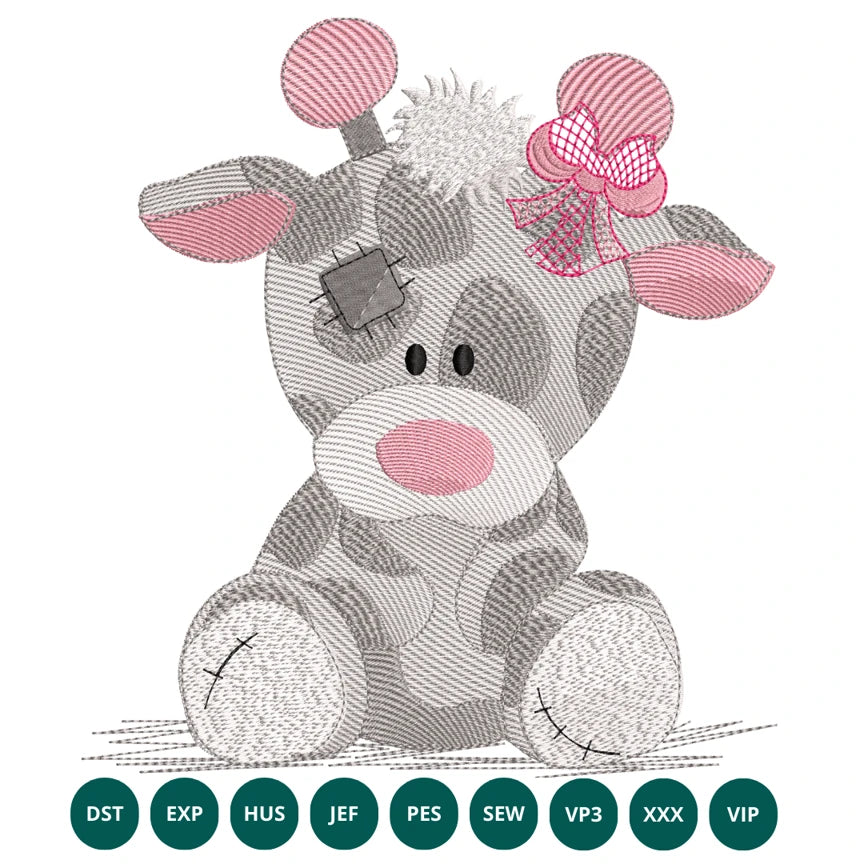
Cute Baby Giraffe Embroidery Design – Patchwork Applique with Bow
- €1.99 EUR
- €1.99 EUR
- Unit price
- per
Formats : DST, PES, JEF, XXX, EXP, HUS, VP3, SEW.

Description
xCute Baby Giraffe Embroidery Design – Patchwork Applique wit
A Charming & High-Quality Patchwork Appliqué for Your Most Tender Projects
Bring sweetness, character, and craftsmanship into your creations with our Cute Baby Giraffe Embroidery Design – Patchwork Applique wit. A lovingly crafted design created to elevate baby projects, nursery décor, and handmade gifts with a soft, expressive touch.


An Embroidery Design Born From Passion & Precision
This Cute Baby Giraffe Embroidery Design – Patchwork Applique wit was developed as part of our ongoing quest to create embroidery motifs that feel both heartwarming and technically remarkable. What began as a simple doodle in a designer’s sketchbook slowly transformed into a multi-layered appliqué featuring delicate textures, intricate fills, and soft patchwork contours designed to stitch beautifully on any machine.
Every curve was refined with care, and each filled area was tested repeatedly to ensure thread density, balance, and clarity. Our team carried out several rounds of test-stitching on different fabrics — from plush minky to crisp cotton — to guarantee flawless results for embroiderers of all skill levels. The result is a baby giraffe with soulful eyes, a playful bow, and a comforting softness that adds instant charm to every project.
The Cute Baby Giraffe Embroidery Design – Patchwork Applique wit carries a small piece of our studio’s story. During a quiet winter morning, one designer shared a memory of visiting a wildlife sanctuary as a child — witnessing a newborn giraffe wobbling gently on its legs, still discovering the world. That moment of innocence and curiosity inspired the gentle expression and stitched patch detailing. Each element, from the soft muzzle to the delicate bow, was shaped to capture the fragile beauty of a baby animal taking its first steps.
✨ Lovely Ways to Use This Design
- Add charm to baby blankets, onesies, and announcement outfits.
- Create nursery décor pieces like cushions, framed hoops, or wall banners.
- Customize diaper bags, bibs, plush toys, and keepsake gifts.
- Perfect for baby showers, gender reveal projects, and handmade boutique pieces.
📥 Instant Download & Included Formats
Your purchase includes the full set of machine embroidery formats: DST, PES, JEF, XXX, EXP, HUS, VP3, VIP, SEW.
Transfer Instructions
xAfter purchasing an embroidery design and downloading it, the file will likely end up in your Downloads folder. You can leave it there.
The file you download is usually in ZIP format. If you're not familiar with ZIP files, they're essentially compressed packages containing multiple files. To access the contents, you need to "unzip" the file first. Your embroidery machine won't be able to read the ZIP file until it's unzipped!
Unzipping a ZIP file is straightforward. On a Mac, ZIP file extraction is built-in. Just double-click the ZIP file, and a folder will be created with all the contents inside. On a PC, try double-clicking the ZIP file. You'll likely be prompted to extract the files. Once confirmed, a folder will be created with the contents inside. If nothing happens when you double-click the zip file, you may need to install a zip file extractor program.
Once you've extracted the ZIP file and started exploring the folders, you'll notice different files formats in each folder. This is because we offer designs in various formats to accommodate different embroidery machines. You'll need to locate the files compatible with your embroidery machine.
After unzipping the file, you can move the files to your hard drive or flash drive.
To transfer the embroidery design to the flash drive, you'll first need to locate the flash drive. When you plug it into your computer, it appears as another hard drive. On a PC, look under "My Computer" to find it listed. On a Mac, you'll see the flash drive listed as a location on the left-hand side of the Finder window. Simply drag and drop the embroidery files you need onto the flash drive.
Legal Notice
x- The logo and artwork you are about to download, when associated with a copyrighted brand, are the intellectual property of the copyright and/or trademark holder. They are provided for lawful use only, under the condition that you obtain express permission from the copyright and/or trademark holder. By proceeding, you acknowledge and accept these terms of use, agreeing that such designs will be used exclusively for non-commercial purposes and in compliance with the DMCA of 1998. Using or reproducing copyrighted brand designs without proper authorization constitutes a violation of international copyright and trademark laws, which may result in financial and criminal penalties.
- Designs not inspired by an official brand are not subject to these restrictions.
- Right of Withdrawal: As this product is digital content supplied via immediate download, you expressly agree that the performance of the contract begins immediately upon purchase. Consequently, in accordance with Article 16(m) of Directive 2011/83/EU, you acknowledge that you waive your 14-day right of withdrawal.
Tips for Best Results
x- Test Stitch First: Always run a test on scrap fabric before applying the design to your final project.
- Use the Right Stabilizer: Choose stabilizers according to fabric type—tear-away for cotton, cut-away for knits, water-soluble for delicate fabrics.
- Adjust Machine Tension: Verify thread tension settings on your machine, especially for metallic or fine threads.
- Mind Your Hooping: Make sure the fabric is hooped tight and flat to avoid misalignment or puckering.
- File Format Compatibility: Be sure to use the correct format for your machine (PES, DST, JEF, etc.).
Need help? Contact us anytime for stitching advice or compatibility questions — we’re here to help!
Frequently bought together
Example product title
- €1.99 EUR
- €1.99 EUR
- Unit price
- per
Example product title
- €1.99 EUR
- €1.99 EUR
- Unit price
- per
Example product title
- €1.99 EUR
- €1.99 EUR
- Unit price
- per
Example product title
- €1.99 EUR
- €1.99 EUR
- Unit price
- per
Example product title
- €1.99 EUR
- €1.99 EUR
- Unit price
- per
- Choosing a selection results in a full page refresh.